Top 12 Cybersecurity Threats Every Internet User Should Know in 2025
The digital landscape in 2025 is more connected — and more dangerous — than ever. With the rise of artificial intelligence, remote work, and smart devices, cybercriminals have found new ways to exploit vulnerabilities. Every internet user, whether individual or business, must stay informed about these evolving threats. This comprehensive guide explains the top 12 cybersecurity threats you should know in 2025, how they work, and how you can protect yourself from them.
1. Ransomware and Extortion-as-a-Service
Why it matters:
Ransomware continues to dominate the cybersecurity threat landscape. In 2025, attackers are operating with business-like precision, offering Ransomware-as-a-Service (RaaS) platforms that allow anyone with minimal technical knowledge to launch attacks. These groups not only encrypt victims’ data but also steal it, threatening to leak sensitive information unless a ransom is paid.
How it works:
Hackers gain access through phishing emails, weak passwords, or unpatched systems. Once inside, they encrypt files, steal confidential data, and demand payment in cryptocurrency. Some attackers now also launch Distributed Denial-of-Service (DDoS) attacks to increase pressure on victims.
Protection Tips:
-
Keep secure, encrypted, and offline backups.
-
Regularly update and patch all software.
-
Use strong Multi-Factor Authentication (MFA) for all critical accounts.
-
Develop an incident response and recovery plan before an attack occurs.
2. AI-Powered Social Engineering (Deepfakes and Voice Cloning)
Why it matters:
Artificial Intelligence (AI) is revolutionizing cybercrime. Hackers now use AI tools to craft convincing phishing messages, deepfake videos, and voice clones that impersonate real people — from CEOs to family members.
How it works:
AI algorithms analyze social media data, past emails, and voice recordings to create realistic imitations. Attackers then trick victims into transferring money, sharing confidential information, or downloading malware.
Protection Tips:
-
Always verify unexpected requests through a secondary communication channel.
-
Train employees and family members to recognize manipulation techniques.
-
Use AI-based email and message filtering tools.
-
Stay skeptical of urgent or emotional messages.
3. Phishing Attacks
Why it matters:
Phishing remains the leading cause of data breaches. Even with advanced security tools, human error is still the biggest weakness in cybersecurity.
How it works:
Cybercriminals send emails or messages pretending to be from trusted sources (like banks or service providers). Victims are tricked into clicking malicious links or entering login credentials on fake websites.
Protection Tips:
-
Never reuse passwords and use a password manager.
-
Double-check sender addresses and URLs.
-
Enable MFA on all major accounts.
-
Avoid clicking links or attachments in unexpected emails.
4. Supply-Chain and Third-Party Attacks
Why it matters:
As businesses rely more on third-party software and vendors, attackers exploit these supply chains. Compromising one vendor can expose thousands of downstream clients.
How it works:
Hackers target software updates, developer tools, or cloud providers to inject malicious code. Once the compromised software is distributed, it infects multiple users automatically.
Protection Tips:
-
Evaluate vendor security before partnerships.
-
Require compliance certifications (ISO 27001, SOC 2).
-
Segment systems to prevent widespread compromise.
-
Monitor third-party access and activities closely.
5. Cloud Misconfigurations and Data Leaks
Why it matters:
Cloud computing offers convenience, but misconfigured servers or storage buckets can expose massive amounts of sensitive data. Many breaches occur due to simple human errors, not complex exploits.
How it works:
Attackers use automated tools to scan for open cloud databases or public storage folders. They can access confidential data or take control of cloud accounts using stolen keys or tokens.
Protection Tips:
-
Use Cloud Security Posture Management (CSPM) tools.
-
Limit administrative privileges and review IAM (Identity Access Management) policies.
-
Encrypt data in storage and during transmission.
-
Regularly audit cloud configurations.
6. Internet of Things (IoT) Vulnerabilities
Why it matters:
Smart devices — from doorbells to medical sensors — often lack strong security controls. Once hacked, these devices can become entry points for larger attacks or be used to form massive botnets.
How it works:
Hackers exploit outdated firmware, open ports, or weak default passwords. Infected IoT devices can be used to spy, steal data, or launch DDoS attacks.
Protection Tips:
-
Change default device passwords immediately.
-
Keep firmware and software updated.
-
Separate IoT devices from your main Wi-Fi network.
-
Disable unnecessary features like remote access.
7. Credential Stuffing and Account Takeovers
Why it matters:
People often reuse passwords across multiple accounts. Cybercriminals take advantage of this by using stolen username-password pairs from old data breaches to gain access to new platforms.
How it works:
Attackers use automated tools to test large databases of stolen credentials on different websites until a match is found.
Protection Tips:
-
Use a unique, strong password for every account.
-
Turn on MFA for all major services.
-
Use a password manager to generate secure passwords.
-
Check if your credentials have been exposed using security monitoring tools.
8. Insider Threats (Accidental and Malicious)
Why it matters:
Sometimes, the danger comes from within. Employees, contractors, or partners with authorized access can intentionally or accidentally leak data.
How it works:
A malicious insider may sell sensitive data, while a careless one might fall for phishing or mishandle confidential files. Both cases can cause severe reputational and financial damage.
Protection Tips:
-
Limit access to sensitive information based on roles.
-
Use monitoring systems to detect abnormal data transfers.
-
Implement strict offboarding procedures when employees leave.
-
Conduct regular cybersecurity awareness training.
9. Zero-Day Exploits and Vulnerability Chaining
Why it matters:
Zero-day vulnerabilities are flaws unknown to software vendors. Cybercriminals exploit them before patches are available. In 2025, advanced attackers combine multiple zero-days to bypass layers of security.
How it works:
Attackers find or purchase new exploits and use them to compromise browsers, operating systems, or security tools. They often chain several vulnerabilities to escalate privileges and gain full control.
Protection Tips:
-
Keep all systems updated as soon as patches are released.
-
Use advanced endpoint detection and response (EDR) tools.
-
Employ network segmentation to contain damage.
-
Monitor for unusual system behavior.
10. Mobile Malware and Fake Apps
Why it matters:
Smartphones now store sensitive data like banking credentials, photos, and private messages. Cybercriminals use fake apps or malicious links to infect mobile devices.
How it works:
Victims download counterfeit apps disguised as legitimate ones or click on malicious ads. Once installed, malware steals data, records keystrokes, or takes control of the device.
Protection Tips:
-
Download apps only from official stores.
-
Avoid third-party app markets and APK files.
-
Regularly review app permissions.
-
Install mobile security or antivirus software.
11. Cryptojacking and Cloud Resource Abuse
Why it matters:
Hackers are increasingly hijacking computing power to secretly mine cryptocurrencies. These attacks waste electricity, slow devices, and rack up expensive cloud bills.
How it works:
Malicious scripts run in browsers or cloud services, using your system resources to mine cryptocurrency. In corporate settings, attackers exploit stolen cloud API keys to launch large-scale mining operations.
Protection Tips:
-
Monitor CPU usage and energy consumption for unusual spikes.
-
Use strong access controls for cloud environments.
-
Block unauthorized scripts on websites.
-
Rotate and protect cloud API keys.
12. Disinformation and Data Manipulation
Why it matters:
In the digital age, information is power. Cybercriminals and state actors spread false data, deepfakes, or manipulated media to damage reputations, influence elections, or extort individuals.
How it works:
Attackers create fake social media profiles, alter documents, or spread fabricated news stories. For individuals, this can mean identity theft or reputational harm; for companies, it can mean loss of trust.
Protection Tips:
-
Monitor your online presence regularly.
-
Avoid sharing personal information publicly.
-
Report fake profiles or misinformation campaigns quickly.
-
Save verified copies of important online documents.
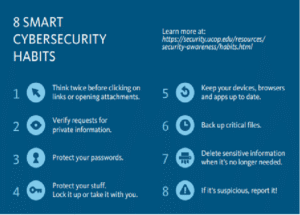
Practical Everyday Cybersecurity Checklist
-
Use strong, unique passwords and store them in a password manager.
-
Enable MFA on every possible account.
-
Keep your software and devices updated.
-
Back up data regularly on offline or encrypted drives.
-
Avoid clicking on suspicious links or attachments.
-
Use secure Wi-Fi and disable auto-connect features.
-
Separate personal, work, and IoT networks.
-
Review your accounts and devices for unauthorized access.
-
Be cautious of unknown USB drives or external devices.
-
Stay informed about new cybersecurity trends.
For Businesses and Teams
-
Enforce MFA and strong identity management policies.
-
Regularly conduct cybersecurity training and phishing simulations.
-
Monitor third-party vendors and supply-chain dependencies.
-
Use firewalls, intrusion detection, and EDR tools.
-
Backup data daily and test restoration procedures.
-
Apply the “zero-trust” model — verify every user and device.
Final Thoughts
Cybersecurity in 2025 is not just an IT concern — it’s a daily responsibility for everyone using the internet. Attackers are evolving rapidly, leveraging AI, automation, and deception to bypass even advanced defenses. The key to staying safe is awareness, vigilance, and proactive protection.
By understanding these top 12 threats and implementing strong cybersecurity habits, you can significantly reduce your exposure and protect both your personal and professional digital life.




Post Comment