How to Protect Your Devices from Online Threats: Tech Safety Guide
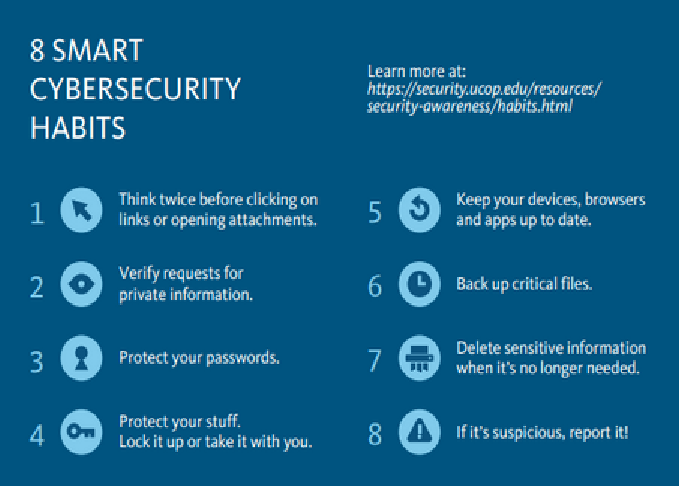
In today’s digital world, our devices—smartphones, laptops, tablets, and even smart home gadgets—are constantly connected to the internet. While this connectivity brings convenience, it also opens the door to a wide range of online threats such as malware, ransomware, phishing, and identity theft. Cybercriminals are becoming more sophisticated, targeting individuals and businesses alike to steal sensitive information or disrupt systems.
Protecting your devices from these threats isn’t just about installing antivirus software anymore—it’s about adopting a proactive, comprehensive approach to cybersecurity. This guide will walk you through everything you need to know about safeguarding your digital life, from recognizing threats to implementing strong protective measures.
Understanding Online Threats
Before you can protect your devices, it’s essential to understand the types of online threats you might face. Here are some of the most common ones:
1. Malware (Malicious Software)
Malware refers to any software designed to damage or exploit devices. Common types include:
-
Viruses: Infect and corrupt files or systems.
-
Trojans: Disguised as legitimate programs but provide unauthorized access.
-
Worms: Spread across networks without user action.
-
Spyware: Secretly monitors user activity and steals information.
-
Ransomware: Locks your files and demands payment for access.
2. Phishing Attacks
Phishing involves tricking users into providing sensitive data like passwords or credit card information through fake emails, websites, or messages. These scams often appear legitimate and can target anyone.
3. Identity Theft
Cybercriminals use stolen personal information to commit fraud or open accounts in your name. This can happen through data breaches or weak security practices.
4. Adware and Pop-Up Scams
Adware bombards users with unwanted advertisements, often slowing down devices or leading to malicious sites.
5. Network Attacks
Public Wi-Fi networks are especially vulnerable to attacks where hackers intercept communications to steal login credentials or sensitive data.
6. Social Engineering
Hackers use psychological manipulation to trick users into giving up confidential information or performing unsafe actions.
Why Cybersecurity Matters
Every piece of data you share online—emails, photos, banking information, or passwords—has value. Once compromised, it can be misused in many harmful ways. The consequences of neglecting cybersecurity include:
-
Financial Loss: Through fraud, scams, or ransomware payments.
-
Privacy Breaches: Exposure of personal or professional data.
-
Reputation Damage: Especially for businesses or influencers.
-
Data Corruption or Loss: Critical files may be deleted or locked.
-
Unauthorized Access: Hackers could control your device or accounts.
By understanding these risks, you can take the right steps to protect yourself and your devices effectively.
Essential Tech Safety Practices
Let’s explore practical ways to strengthen your digital defenses.
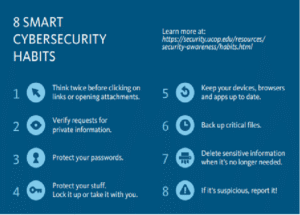
1. Keep Your Software Up-to-Date
Software developers regularly release updates to patch security vulnerabilities. Cybercriminals exploit outdated systems, so enabling automatic updates is crucial. This includes:
-
Operating systems (Windows, macOS, Android, iOS)
-
Browsers (Chrome, Firefox, Edge, Safari)
-
Apps and security tools
Outdated software is one of the most common reasons devices get hacked, so always install updates as soon as they are available.
2. Use Strong and Unique Passwords
Passwords are your first line of defense against unauthorized access. Follow these best practices:
-
Use a mix of uppercase letters, lowercase letters, numbers, and symbols.
-
Avoid using obvious details like your name or birthdate.
-
Don’t reuse passwords across multiple accounts.
-
Use a password manager to store and generate strong passwords securely.
-
Enable multi-factor authentication (MFA) wherever possible for an extra layer of protection.
MFA ensures that even if a hacker steals your password, they can’t access your account without a second verification method like an SMS code or authentication app.
3. Install Reliable Security Software
A robust antivirus and anti-malware program can detect and block threats before they harm your system. Look for software that includes:
-
Real-time protection
-
Web browsing security
-
Email and phishing protection
-
Ransomware shields
Some popular options include built-in tools like Windows Defender or premium solutions like Bitdefender, Kaspersky, or Norton.
4. Be Cautious with Emails and Links
Phishing remains one of the easiest ways for hackers to gain access. Follow these rules:
-
Never click on suspicious links or attachments.
-
Check the sender’s email address carefully—it may look legitimate but contain small variations.
-
Hover over links before clicking to see the true destination.
-
Avoid providing personal details through email unless verified.
When in doubt, contact the company directly through official channels.
5. Secure Your Wi-Fi Network
Your home Wi-Fi can be a gateway for hackers if not properly protected. Secure it with these steps:
-
Change the default router name and password.
-
Use WPA3 encryption for stronger security.
-
Hide your network (SSID) to make it less visible.
-
Disable remote management on your router.
-
Regularly update router firmware.
If you use public Wi-Fi, consider using a VPN (Virtual Private Network) to encrypt your internet traffic.
6. Use a VPN for Privacy
A VPN masks your IP address and encrypts your data, making it difficult for hackers or even ISPs to track your activity. It’s especially useful when:
-
Using public or shared Wi-Fi.
-
Accessing banking or confidential information.
-
Traveling internationally.
Choose a reputable VPN provider with a no-log policy to ensure your browsing remains private.
7. Enable Device Encryption
Encryption converts your data into unreadable code, protecting it even if your device is lost or stolen. Most modern devices have built-in encryption features such as:
-
BitLocker (Windows)
-
FileVault (Mac)
-
Android and iOS encryption by default
Make sure these features are enabled and always lock your device with a PIN, password, or biometric authentication.
8. Backup Your Data Regularly
Data loss can occur due to ransomware attacks, hardware failure, or accidental deletion. Set up automatic backups to an external hard drive or cloud service. Recommended backup strategies include:
-
3-2-1 Rule: Keep three copies of your data—two local (different devices) and one offsite (cloud).
-
Use services like Google Drive, OneDrive, iCloud, or Dropbox for convenience and reliability.
Backups ensure that even if you lose access to your main device, your important data remains safe.
9. Limit App Permissions
Many apps request access to your contacts, location, camera, or microphone unnecessarily. Review these permissions regularly and disable those that are not required.
For Android and iOS users:
-
Go to Settings > Privacy to manage permissions.
-
Avoid downloading apps from unknown sources.
-
Check app reviews and developer information before installation.
10. Practice Safe Browsing Habits
Your browser is often the first point of contact with online threats. Follow these tips to stay safe:
-
Use secure websites with HTTPS (look for the lock icon in the address bar).
-
Clear cookies and cache regularly.
-
Use a privacy-focused browser like Brave, Firefox, or DuckDuckGo.
-
Install extensions that block ads, pop-ups, and trackers (e.g., uBlock Origin, Privacy Badger).
11. Protect Your Mobile Devices
Smartphones are prime targets because they store sensitive data like banking details and personal messages. To secure your mobile device:
-
Keep the operating system and apps updated.
-
Avoid rooting or jailbreaking your phone—it weakens security layers.
-
Use biometric locks (fingerprint or face recognition).
-
Install apps only from official stores like Google Play or Apple App Store.
-
Enable “Find My Device” features for remote lock and wipe.
12. Be Mindful of Social Media Security
Cybercriminals often gather information from social media to launch targeted attacks. Protect your online identity by:
-
Limiting what personal information you share publicly.
-
Adjusting privacy settings to control who sees your posts.
-
Avoiding sharing details like travel plans, location, or family information.
-
Using strong, unique passwords for social media accounts.
13. Recognize Signs of a Compromised Device
Knowing how to spot a potential breach can save you from major losses. Warning signs include:
-
Unusual pop-ups or redirects while browsing.
-
Slow performance or overheating.
-
New programs or icons appearing without installation.
-
Accounts being locked or accessed without your consent.
-
Excessive data usage or battery drain.
If you suspect an infection:
-
Disconnect from the internet immediately.
-
Run a full antivirus scan.
-
Change your passwords from a secure device.
-
Backup important files.
-
Restore your system to a clean state if needed.
14. Educate Yourself and Others
Cybersecurity awareness is one of the best defenses against online threats. Stay informed by:
-
Following cybersecurity blogs or news.
-
Learning how new scams and attacks work.
-
Teaching family members about safe online habits.
Children and elderly users are especially vulnerable, so ensure they know not to click suspicious links or share private information.
15. Secure Smart Home Devices
Internet of Things (IoT) devices like smart TVs, cameras, and thermostats are often overlooked but can be exploited. To protect them:
-
Change default login credentials immediately.
-
Disable unnecessary features such as remote access.
-
Keep firmware updated.
-
Use a separate Wi-Fi network for smart devices.
16. Implement Cybersecurity Tools for Extra Protection
Beyond antivirus software, consider adding these tools:
-
Firewall: Blocks unauthorized access to your network.
-
Anti-spyware: Detects hidden programs tracking your activity.
-
Password Manager: Creates and stores complex passwords safely.
-
Identity Theft Protection Services: Monitor your personal data across the web.
These tools provide multiple layers of defense, making it much harder for cybercriminals to succeed.
17. Business Users: Protecting Work Devices
For professionals or business owners, cybersecurity becomes even more critical. A breach can lead to data loss, lawsuits, and damaged trust.
-
Use endpoint protection for all company devices.
-
Implement secure access control and restrict admin rights.
-
Train employees to identify phishing attempts.
-
Regularly audit and update security policies.
Conclusion: Stay Vigilant, Stay Safe
Protecting your devices from online threats is not a one-time task—it’s an ongoing process. As technology evolves, so do cybercriminals’ tactics. Staying vigilant, informed, and proactive is key to maintaining digital safety.
By following the best practices outlined in this guide—updating your software, using strong passwords, installing security tools, and being cautious online—you can significantly reduce your risk of falling victim to cyberattacks.




Post Comment