A Complete Beginner’s Guide to Learning Web Development from Scratch
In today’s digital era, every business, brand, and professional needs an online presence. Websites have become the backbone of global communication, marketing, and commerce. As technology evolves, the demand for skilled web developers continues to grow. Whether you’re looking to start a career in tech, create your own website, or freelance, learning web development from scratch can open countless doors.
This guide will walk you through everything you need to know to begin your journey — from understanding what web development is to mastering essential tools, languages, and frameworks.
Understanding Web Development: What It Really Means
Web development refers to the process of building and maintaining websites. It covers everything from creating simple static pages to developing complex web applications.
There are two main parts of web development:
-
Front-End Development – This is what users see and interact with on a website. It involves the design, layout, and user interface (UI).
-
Back-End Development – This deals with the server, databases, and application logic that power the website behind the scenes.
Together, these components form Full-Stack Development, which combines both front-end and back-end skills to create complete web solutions.
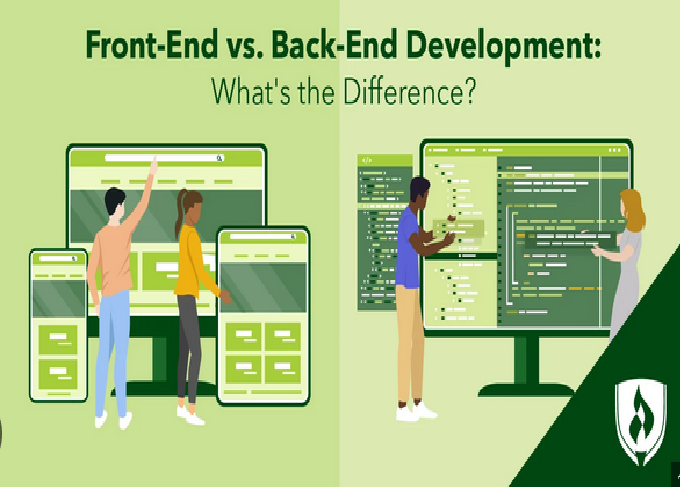
Front-End vs. Back-End Development
Before diving into coding, it’s important to understand the difference between the two main sides of web development:
-
Front-End Development focuses on the visual and interactive parts of a website. It uses technologies like HTML, CSS, and JavaScript to build the layout, animations, and user experience.
-
Back-End Development focuses on how the website functions. It handles data storage, authentication, and communication between the client (user) and the server using languages like Python, PHP, Node.js, or Ruby.
Both roles are vital to building a functional website.
Step 1: Start with the Basics – HTML, CSS, and JavaScript
To build a website from scratch, you must first learn the core building blocks of the web.
1. HTML (HyperText Markup Language)
HTML is the foundation of any website. It defines the structure and content, such as headings, paragraphs, images, and links. Think of it as the “skeleton” of a webpage.
Key concepts to learn:
-
HTML tags and elements
-
Attributes and links
-
Forms and inputs
-
Semantic HTML (for accessibility and SEO)
2. CSS (Cascading Style Sheets)
CSS is used to style and design your HTML structure. It controls the layout, colors, typography, and spacing to make your website visually appealing.
Essential topics include:
-
Selectors and properties
-
Flexbox and Grid layouts
-
Responsive design (mobile-friendly pages)
-
Transitions and animations
3. JavaScript (JS)
JavaScript brings interactivity to websites. It’s a programming language that allows you to create dynamic features like sliders, pop-ups, and form validation.
Learn the basics such as:
-
Variables, data types, and operators
-
Functions and loops
-
DOM manipulation
-
Events and event handling
Once you’re comfortable with JavaScript, you can explore advanced topics like ES6 features, APIs, and frameworks.
Step 2: Learn Version Control (Git and GitHub)
As you build projects, it’s essential to keep track of your code changes. That’s where Git comes in.
-
Git allows you to manage your code history and revert changes when needed.
-
GitHub is a platform to host your projects online and collaborate with other developers.
Basic commands to learn:
-
git init,git add,git commit,git push -
Creating branches and merging code
-
Working with remote repositories
Learning version control early will help you manage your projects professionally.
Step 3: Build Small Projects
The best way to learn web development is by doing. Start creating small projects to apply your knowledge:
-
Personal portfolio website
-
To-do list app using JavaScript
-
Simple blog layout with HTML and CSS
-
Calculator or weather app
These mini-projects will boost your confidence and strengthen your problem-solving skills.
Step 4: Understand Responsive Web Design
In 2025, most users access the web from mobile devices. Therefore, learning responsive design is crucial.
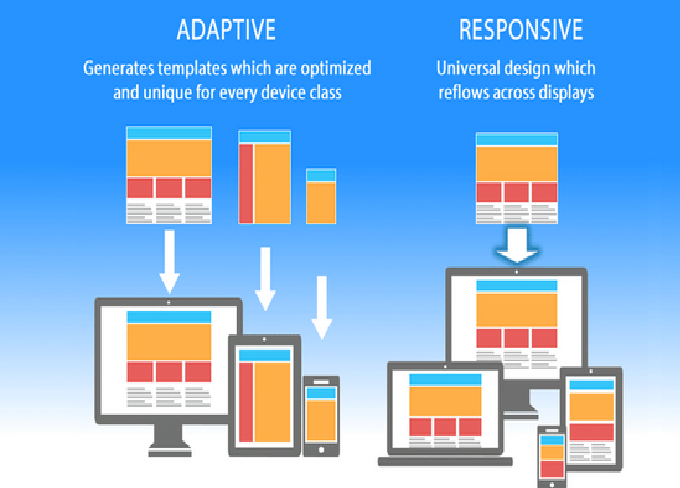
Responsive design ensures that your website looks good on all screen sizes — desktop, tablet, and smartphone.
Key tools and concepts include:
-
Media queries in CSS
-
Flexible layouts with CSS Grid and Flexbox
-
Responsive images
-
Frameworks like Bootstrap or Tailwind CSS
Step 5: Move to Advanced Front-End Development
Once you’ve mastered HTML, CSS, and JavaScript, it’s time to move to modern frameworks and libraries that make development faster and more efficient.
1. React.js
React is one of the most popular JavaScript libraries used for building interactive user interfaces. It uses components to create reusable pieces of code.
2. Vue.js
Vue is known for its simplicity and flexibility. It’s a great option for beginners looking to create dynamic web apps.
3. Angular
Angular is a full-fledged front-end framework developed by Google. It’s widely used in enterprise applications.
Learning at least one of these will make you job-ready for front-end development roles.
Step 6: Introduction to Back-End Development
After getting comfortable with the front end, you can explore how the back end works.
Back-end development handles data, servers, and business logic. The most common back-end languages include:
-
Node.js (JavaScript-based)
-
Python (Django, Flask)
-
PHP (Laravel)
-
Ruby (Rails)
-
Java (Spring Boot)
To get started, learn how to:
-
Set up a server
-
Create APIs (Application Programming Interfaces)
-
Connect to databases
-
Handle authentication and security
Step 7: Learn About Databases
Databases store and organize website data, such as user information, posts, or product details.
There are two main types of databases:
-
SQL Databases (Structured) – Examples include MySQL, PostgreSQL, and SQLite. They use structured tables and queries.
-
NoSQL Databases (Unstructured) – Examples include MongoDB and Firebase. They store data in flexible formats like JSON.
Learning how to integrate databases with your back-end code will help you create full-fledged web applications.
Step 8: Explore APIs and JSON
APIs allow your website to communicate with other services. For example, a weather app fetches data from a weather API.
Understanding RESTful APIs and JSON (JavaScript Object Notation) will help you integrate external data and services into your projects.
Try building projects like:
-
Movie search app using an external API
-
Real-time chat app
-
Weather forecast dashboard
Step 9: Learn Web Hosting and Deployment
Building a website is only half the job — you also need to put it online. Web hosting allows your site to be accessible worldwide.
Learn how to:
-
Purchase a domain name
-
Use hosting services like Netlify, Vercel, or GitHub Pages for front-end projects
-
Deploy full-stack apps using Heroku, Render, or AWS
Deployment gives you real-world experience and makes your portfolio more professional.
Step 10: Master Essential Web Development Tools
Professional developers rely on a range of tools to increase productivity and code quality.
Here are some must-learn tools:
-
Code Editors: Visual Studio Code, Sublime Text
-
Package Managers: npm, Yarn
-
Build Tools: Webpack, Babel, Parcel
-
Browser DevTools: For debugging and performance testing
Step 11: Learn About Web Security
Security is a major part of web development. Understanding basic web security principles will help you protect your projects and users.
Important concepts include:
-
HTTPS and SSL certificates
-
Input validation
-
Cross-Site Scripting (XSS) prevention
-
Password hashing and encryption
By integrating security best practices, you can build safer and more reliable applications.
Step 12: Explore Full-Stack Development
Once you’re confident in both front-end and back-end technologies, you can call yourself a Full-Stack Developer.
A full-stack developer understands how to build a complete web application — from the user interface to the server and database.
Popular full-stack combinations include:
-
MERN Stack (MongoDB, Express, React, Node.js)
-
MEAN Stack (MongoDB, Express, Angular, Node.js)
-
LAMP Stack (Linux, Apache, MySQL, PHP)
Becoming full-stack allows you to work independently and handle entire projects.
Step 13: Build a Strong Portfolio
A portfolio showcases your skills to potential employers or clients. Include:
-
3–5 real projects (websites or apps)
-
Clean design and clear navigation
-
Description of tools and technologies used
-
Links to your GitHub and live demos
A good portfolio helps you stand out and demonstrates your ability to turn ideas into functional projects.
Step 14: Practice Problem Solving and Coding Challenges
To sharpen your programming logic, practice regularly on coding platforms such as:
-
LeetCode
-
HackerRank
-
Codewars
Problem-solving skills will improve your ability to write efficient and optimized code.
Step 15: Stay Updated with New Trends
The world of web development changes rapidly. New frameworks, libraries, and tools emerge every year.
Stay updated by:
-
Reading tech blogs and newsletters
-
Following developers on social media
-
Watching tutorials on YouTube
-
Contributing to open-source projects
Continuous learning is key to long-term success in web development.
Step 16: Join Developer Communities
Joining online communities helps you network, learn, and get support. Some great places to start include:
-
GitHub – Collaborate on projects
-
Stack Overflow – Ask coding questions
-
Reddit (r/webdev) – Discuss trends and tools
-
Discord/Slack groups – Connect with developers globally
Networking can also help you find job opportunities and mentorship.
Step 17: Learn About Career Opportunities
Once you’ve developed strong skills, there are many career paths you can pursue:
-
Front-End Developer
-
Back-End Developer
-
Full-Stack Developer
-
Web Designer
-
UI/UX Developer
-
Freelance Web Developer
Each path offers excellent growth potential, flexibility, and competitive salaries.
Step 18: Start Freelancing or Apply for Jobs
You can start your career by freelancing on platforms like Upwork, Fiverr, or Toptal. Alternatively, you can apply for full-time positions in tech companies.
When applying, make sure to:
-
Build a strong resume and LinkedIn profile
-
Showcase your portfolio
-
Highlight your technical and soft skills
Practical experience, even through small projects or internships, can make a big difference.
Step 19: Keep Practicing and Building Projects
The more you build, the more you learn. Try recreating real-world websites or developing apps that solve everyday problems.
Some project ideas:
-
E-commerce website
-
Blogging platform
-
Social media app
-
Task manager or note-taking app
Each project adds to your knowledge and portfolio.
Conclusion: Your Journey Begins Now
Learning web development from scratch may seem challenging at first, but with consistency and practice, it becomes an exciting journey of creativity and growth.
Start small, master the fundamentals, and build projects that challenge you. Over time, you’ll gain the skills and confidence to create professional websites and applications.



Post Comment